# Lookup Tables

**Lookup Tables** are operator-curated reference tables that live inside the ODD Platform itself rather than in an external source system. The platform manages their lifecycle end-to-end: schema definition, row-level data entry, versioning of structure changes, RBAC, and read access via the platform's API. Each lookup table is exposed in the catalog as a standard Data Entity (entity type `LOOKUP_TABLE`, ID `24`), so existing search, tagging, descriptions, and term-linking flows apply uniformly.

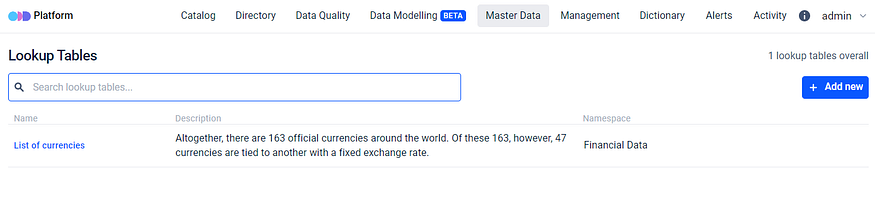
In the platform UI, lookup tables live under the top-level **Master Data** tab → **Lookup Tables**. The same page name appears throughout the API and code as "Lookup Table"; "Master Data" is the toolbar tab label, "Lookup Table" is the per-row noun.

![Master Data → Lookup Tables list page — every lookup table the user can read, with name, description, and namespace columns plus search and the + Add new entry-point gated by the LOOKUP\_TABLE\_CREATE permission.](/files/UdauHXmx9hK012HuKVdA)

## Creating a Lookup Table

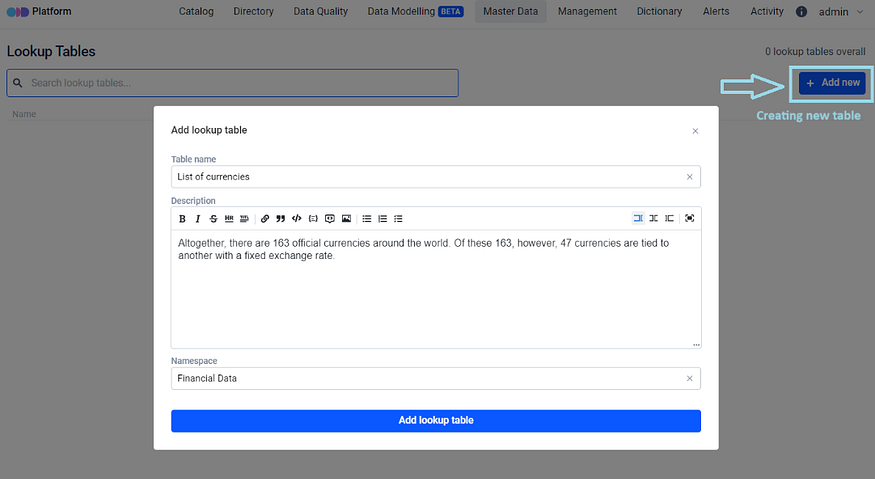
The creation of Lookup Tables involves adding a new table through the **`+Add new`** button in the right upper corner of the Master Data section. On a physical level, this implies that an actual table will be generated by ODD using the specified [configuration](/configuration-and-deployment/odd-platform.md) connection. These tables are entirely managed by the ODD Platform.

<figure><img src="/files/8w2aW2u1BaudcFuccRmm" alt="" height="383" width="700"><figcaption><p>Adding a new table</p></figcaption></figure>

When a Lookup Table is created a Data Entity of type "lookup table" is generated.

<figure><img src="/files/5kstwQtvq6ahSV7l7xSD" alt="" height="162" width="700"><figcaption><p>Lookup Table is created</p></figcaption></figure>

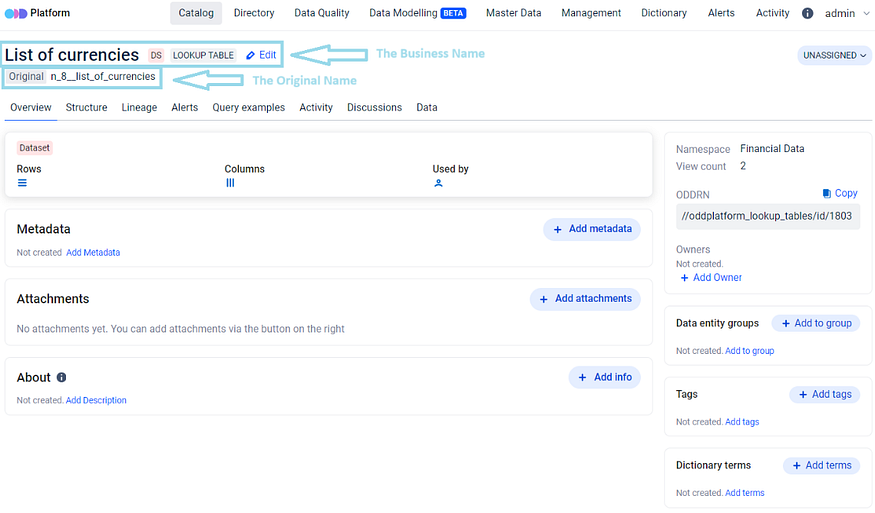
The Table name entered during creation is assigned to it as a Business Name. Simultaneously, an Original Name is provided, prefixed with the ID of Namespace. This prefix is added to distinguish tables with potentially identical names and it ensures that the tables adhere to a format acceptable for PostgreSQL.

<figure><img src="/files/EahgpsjKU1G2Pl7hjoFn" alt="" height="411" width="700"><figcaption><p>The Business and the Original names of Lookup Table</p></figcaption></figure>

The Original Name of Lookup Table functions as a table identifier within PostgreSQL, allowing it to be identified by the users. This information is useful when tasks such as uploading the table elsewhere or establishing a direct connection to the table data are required.

## Lookup Table structure

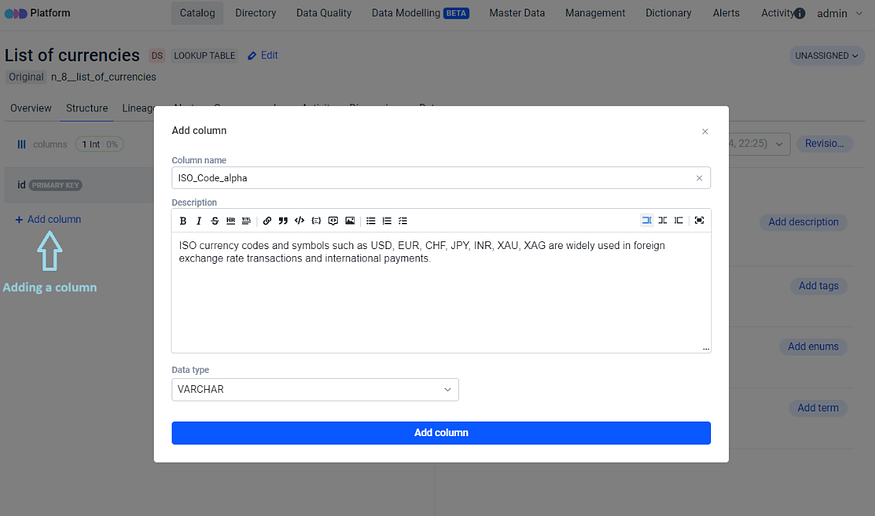
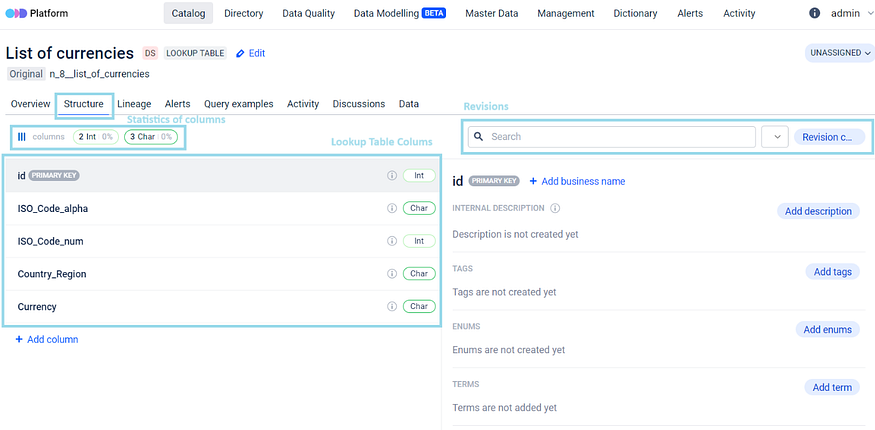
The creation of the Lookup Table structure starts with column creation on a Structure Tab. Column creation starts with **`+Add column`** button and requires the specification of Column Name.

<figure><img src="/files/XAULHz6MERzaYLK0y5BH" alt="" height="413" width="700"><figcaption><p>Column creation</p></figcaption></figure>

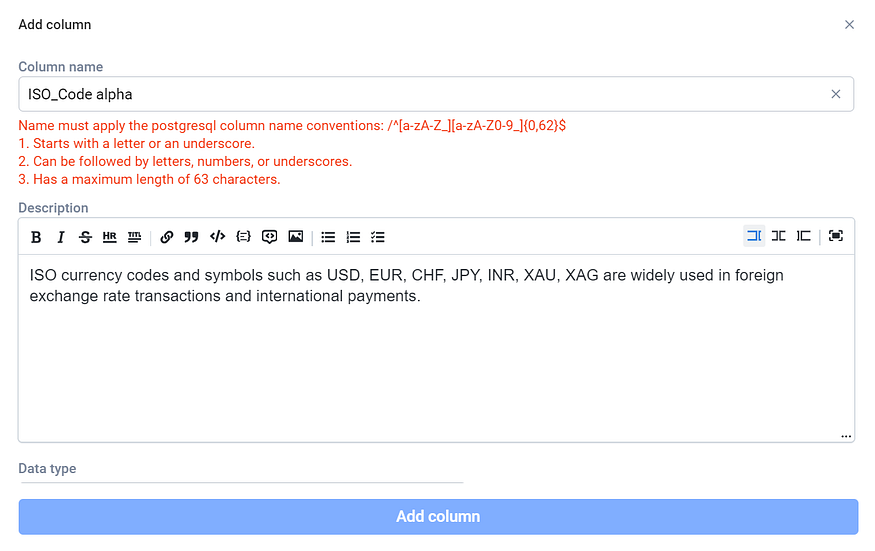
In contrast to the Table Name, which can assume any format, the right selection of name at this stage is crucial and adhering to a specific format is considered essential.

<figure><img src="/files/hOiWcNpi8ak0dHTLFs7N" alt="" height="442" width="700"><figcaption><p>Specific format for Column Name is required</p></figcaption></figure>

Further, the creation of Descriptions occurs at this point. Essentially, the columns that will be generated within the current table are the focus of these descriptions. The final step in creating a column involves selecting a Data Type. Currently, a limited list of PostgreSQL data types is supported for columns (see [Supported field types](#supported-field-types) below). Once the Column Name, Description and Data Type are provided, the column is created by clicking on the **`Add column`** button.

<figure><img src="/files/1ykzIl5KWM3ayJTY74qn" alt="" height="344" width="700"><figcaption><p>Lookup Table Structure</p></figcaption></figure>

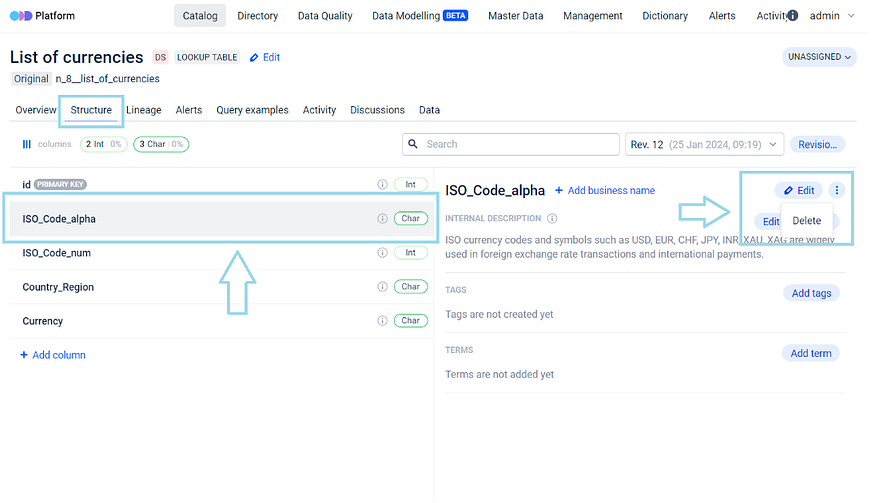
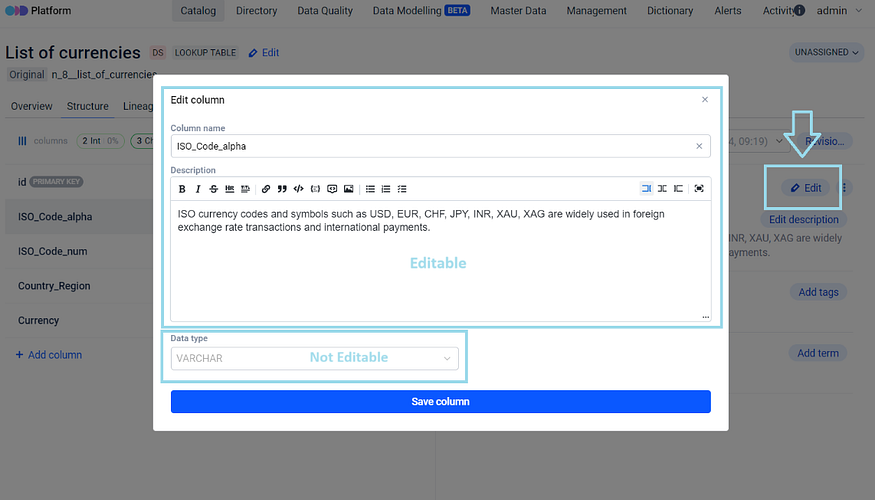
It is possible to further edit, i.e. to rename column or edit the description for that column, or delete columns:

<figure><img src="/files/0RqUEzE2gkCE7vzDSL8m" alt="" height="403" width="700"><figcaption><p>Deleting a Column</p></figcaption></figure>

Once a column is created and its corresponding data type is already selected, the alteration of that data type becomes impossible.

<figure><img src="/files/XccErxVj6RJisaq9kw3z" alt="" height="400" width="700"><figcaption><p>Editing a Column</p></figcaption></figure>

If there is a need to change the data type for a column, a secure approach involves the:

1. creation of a new column with the desired data type,
2. transfer of the old column data to the new column, and
3. deletion of the old column.

This method ensures a ***secure approach to any data migration***.

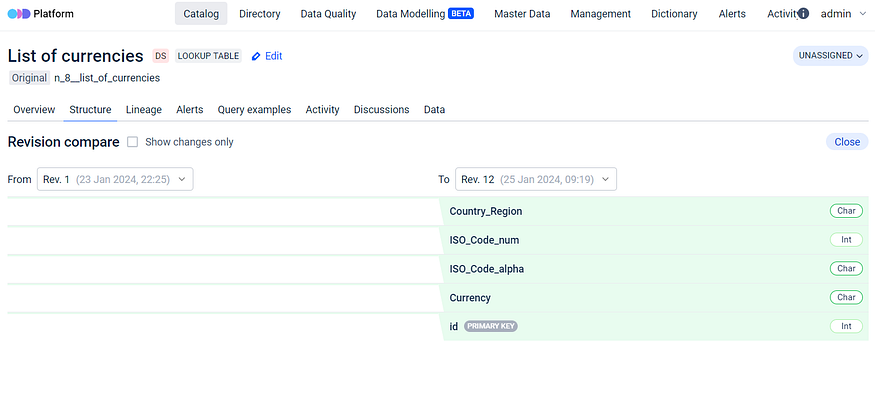
Each time the table structure is modified, a new revision of structure is generated, allowing table version differences to be tracked.

<figure><img src="/files/fHlxKDwcbcuAJWbAx2hw" alt="" height="332" width="700"><figcaption><p>Revisions</p></figcaption></figure>

### Supported field types

A column's data type is selected once at column creation and cannot be changed afterwards (use the migration pattern above). The platform exposes the following PostgreSQL types via the `LookupTableFieldType` enum:

| Field type | PostgreSQL mapping | Typical use                                                                                                                             |
| ---------- | ------------------ | --------------------------------------------------------------------------------------------------------------------------------------- |
| `VARCHAR`  | `varchar`          | Variable-length text.                                                                                                                   |
| `INTEGER`  | `integer`          | 4-byte signed integer.                                                                                                                  |
| `SERIAL`   | `serial`           | Auto-incrementing integer (typical for synthetic keys); the primary-key `id` column is generated automatically and cannot be redefined. |
| `DECIMAL`  | `numeric`          | Arbitrary-precision decimal.                                                                                                            |
| `BOOLEAN`  | `boolean`          | True/false.                                                                                                                             |
| `DATE`     | `date`             | Calendar date (no time component).                                                                                                      |
| `TIME`     | `time`             | Time of day (no date component).                                                                                                        |
| `JSON`     | `json`             | JSON document.                                                                                                                          |
| `UUID`     | `uuid`             | 128-bit identifier.                                                                                                                     |

Per-column validation is also configurable: each field carries `is_nullable` (default `true`), `is_unique` (default `false`), and an optional `default_value` string.

## Adding and managing data

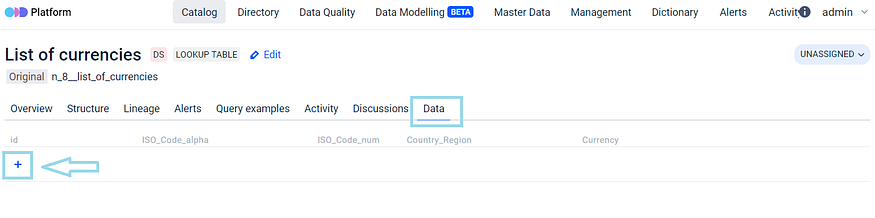
Within ODD Platform an exclusive Data tab is made available for Lookup Tables. It displays a table with headers that mirror the structure of Lookup Table, which is created in the Structure tab. When a column is added in the Structure tab, its appearance in the Data tab is immediate.

Data values can be inputted into the table columns by clicking on **`[+]`** button within the Data tab.

<figure><img src="/files/5bAZZv08vREgWDJTr4Lt" alt="" height="175" width="700"><figcaption><p>Lookup Table Headers</p></figcaption></figure>

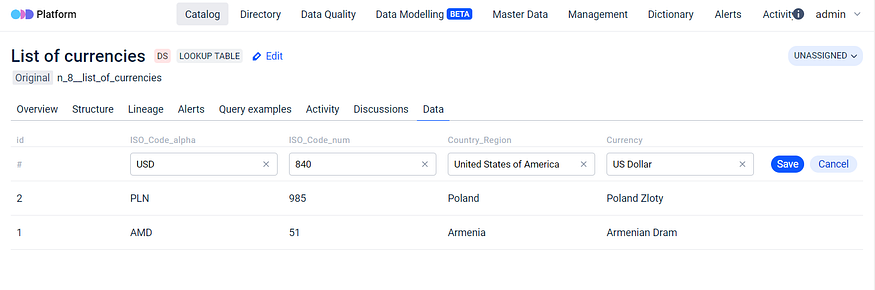
This table has a flexible structure, allowing addition of multiple diverse columns.

<figure><img src="/files/YLqBzUcLh4sohN0T3x8H" alt="" height="232" width="700"><figcaption><p>Filling in the columns with data</p></figcaption></figure>

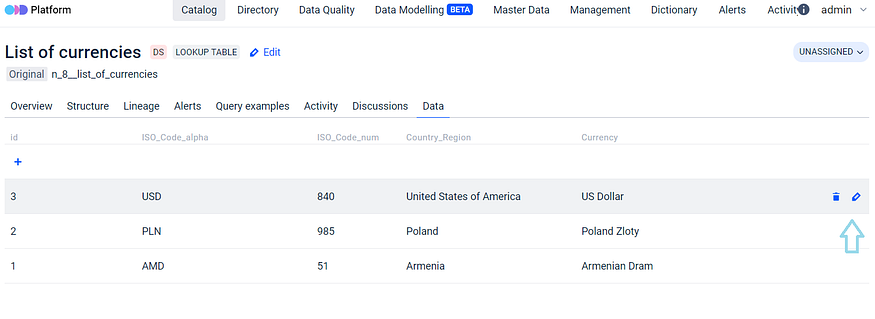
Even after filling in the columns with data, the table structure remains customizable, i.e. it is still possible to edit, add or delete its columns. The filled in data is also subject to be edited or deleted.

<figure><img src="/files/Nenqh4Ct2qyaOmf9Cgie" alt="" height="255" width="700"><figcaption><p>Lookup Table Data is subject to be edited or deleted</p></figcaption></figure>

The information entered into the table resides in a separate schema within the database (`lookup_tables_schema` — see [Direct database access](#direct-database-access) below).

## Lookup Table vs regular Data Entity

The Lookup Table is essentially the same as regular Data Entity in ODD. The key difference lies in the fact that for a standard data entity there is no direct ability to modify its structure while for a lookup table the interaction with the structure becomes possible.

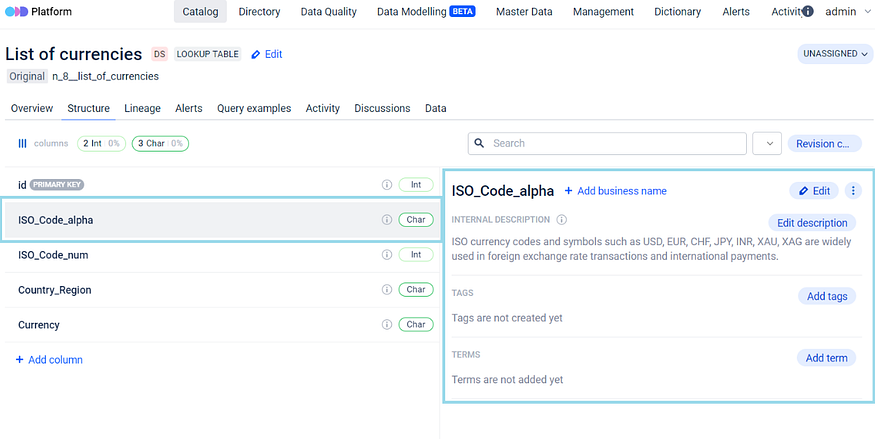
All the actions possible with the structure in any other data entity, such as adding Descriptions, Tags, Terms and Business Names can be performed both with Lookup Table itself and its columns also.

<figure><img src="/files/wC5ZnUBW4M6o7ylAi1DL" alt="" height="352" width="700"><figcaption><p>Adding Descriptions, Tags, Terms and Business Names to Lookup Table itself and to its columns</p></figcaption></figure>

Also, the ID column, marked as the Primary Key, is automatically generated and cannot be modified. While the Primary key is currently unchangeable, there are plans for future developments that will enhance user experience by allowing interaction with it.

## Accessing Lookup Table data

Access to the data in the Lookup table is available by the distinct schema within PostgreSQL, and it can also be accessed via an API.

* **Access via an API** is currently considered not the most user friendly or recommended method, because with this access for example only column IDs are accessible and not their corresponding names. Nevertheless, assistance from our team is available to users in configuring access, ensuring that additional data can also be made available through the API in such cases. The full surface is documented at [API Reference → Reference Data](/developer-guides/api-reference/reference-data.md).
* **Direct database access** is the recommended path for downstream consumers (BI tools, ETL jobs, ad-hoc queries) that need the human-readable column names.

### Direct database access

For all of its features ODD Platform uses PostgreSQL database and PostgreSQL database only. Database connection defining block would look like this:

{% code title="YAML" overflow="wrap" %}

```yaml
spring.custom-datasource.url
#unset by default (@Value("${spring.custom-datasource.url:}")); falls back to
#spring.datasource.url, which itself defaults to jdbc:postgresql://127.0.0.1:5432/odd-platform
spring.custom-datasource.username
#unset by default; falls back to spring.datasource.username (default: odd-platform)
spring.custom-datasource.password
#unset by default; falls back to spring.datasource.password (default: odd-platform-password)
```

{% endcode %}

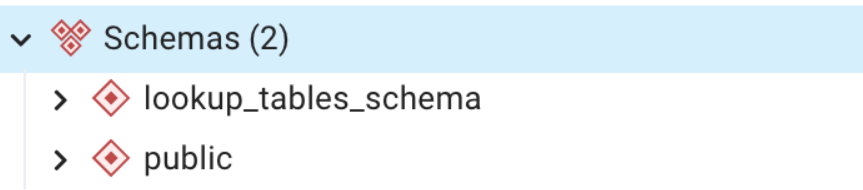
Within PostgreSQL, ODD Platform database comprises two primary schemas:

* **public** — this schema contains the essential resources of the ODD itself;
* **lookup\_tables\_schema** — this schema contains all the lookup tables created by the user.\
  Users can interact with these tables just like any other regular tables within the database.

<figure><img src="/files/CVOmLMDzLPDawdfustNG" alt="" height="155" width="700"><figcaption><p>ODD Platform database two primary schemas</p></figcaption></figure>

Placing them in a separate schema is a matter of convenience, aimed to simplify the management of these tables particularly during migration like activities. This approach ensures a clear separation between user tables and service tables, allowing for independent handling and manipulation.

## RBAC permissions

Lookup Table actions are gated by 9 permissions on three surfaces — table, definition (the column schema), and data (the rows). Assign these via the platform's [Policies](/configuration-and-deployment/enable-security/authorization/policies.md) and [Roles](/configuration-and-deployment/enable-security/authorization/roles.md) flow. The full permission list is regenerated from the OpenAPI spec under [Permissions](/configuration-and-deployment/enable-security/authorization/permissions.md); the rows specific to Lookup Tables:

| Permission                       | Surface              | What it gates                                                                                                     |
| -------------------------------- | -------------------- | ----------------------------------------------------------------------------------------------------------------- |
| `LOOKUP_TABLE_CREATE`            | Table                | Creating a new lookup table (the `+Add new` flow).                                                                |
| `LOOKUP_TABLE_UPDATE`            | Table                | Renaming a lookup table or editing its description.                                                               |
| `LOOKUP_TABLE_DELETE`            | Table                | Deleting a lookup table.                                                                                          |
| `LOOKUP_TABLE_DEFINITION_CREATE` | Definition (columns) | Adding a column to an existing table's structure.                                                                 |
| `LOOKUP_TABLE_DEFINITION_UPDATE` | Definition (columns) | Editing column metadata (rename, description, validation flags). The data type itself cannot be changed once set. |
| `LOOKUP_TABLE_DEFINITION_DELETE` | Definition (columns) | Deleting a column from the structure.                                                                             |
| `LOOKUP_TABLE_DATA_CREATE`       | Data (rows)          | Inserting a new row.                                                                                              |
| `LOOKUP_TABLE_DATA_UPDATE`       | Data (rows)          | Editing an existing row's cell values.                                                                            |
| `LOOKUP_TABLE_DATA_DELETE`       | Data (rows)          | Deleting a row.                                                                                                   |

The split lets operators grant edit-the-data without grant-edit-the-schema (a typical pattern for steward-curated reference lists), or grant create-the-table without grant-fill-the-data.

## API reference

The full HTTP API for Lookup Tables is documented at [API Reference → Reference Data](/developer-guides/api-reference/reference-data.md) — 16 endpoints across four groups (Table CRUD, Column CRUD, Row CRUD, Search) under `/api/referencedata/`, plus the `LookupTableFieldType` mapping notes and the per-endpoint `LOOKUP_TABLE_*` RBAC gating that ties back to the [permissions table above](#rbac-permissions).

## Where to next

* [Master Data Management](/features/master-data-management.md) — the parent pillar landing; positions Lookup Tables within the broader MDM / Reference-Data Management surface and the Data Governance map.
* [Data Modelling](/features/data-modelling.md) — the sibling pillar for query examples and entity relationships.
* [Permissions](/configuration-and-deployment/enable-security/authorization/permissions.md) — the canonical, regenerated-from-spec permission list (includes the 9 Lookup Tables rows above).
* [Configure ODD Platform](/configuration-and-deployment/odd-platform.md) — the Spring datasource keys (`spring.custom-datasource.*`) the platform uses for both its own metadata and the `lookup_tables_schema`.


---

# Agent Instructions: Querying This Documentation

If you need additional information that is not directly available in this page, you can query the documentation dynamically by asking a question.

Perform an HTTP GET request on the current page URL with the `ask` query parameter:

```
GET https://docs.opendatadiscovery.org/features/master-data-management/lookup-tables.md?ask=<question>
```

The question should be specific, self-contained, and written in natural language.
The response will contain a direct answer to the question and relevant excerpts and sources from the documentation.

Use this mechanism when the answer is not explicitly present in the current page, you need clarification or additional context, or you want to retrieve related documentation sections.