> For the complete documentation index, see [llms.txt](https://docs.opendatadiscovery.org/llms.txt). Markdown versions of documentation pages are available by appending `.md` to page URLs; this page is available as [Markdown](https://docs.opendatadiscovery.org/features/data-glossary/business-glossary.md).
# Business Glossary
Full reference for the in-app Business Glossary — term entities, the Dictionary tab UI, namespace scoping, ownership and RBAC, term-to-term linking, and term-to-data-entity descriptive associations.
The **Business Glossary** is ODD Platform's operator-curated catalog of term entities — the concepts your data represents (`Customer`, `Order`, `Active User`), captured as first-class catalog entities with their own descriptions, owners, tags, and links to the data entities they explain.
This page is the canonical reference for the feature. For where it sits among the other governance pillars, see the [Data Glossary](/features/data-glossary.md) pillar landing.
## What terms are
A **term** in ODD Platform is a Data Entity of type `TERM`. Like every other data-entity class, a term has:
* A **name** (the canonical label — `Customer`, `Active User`, `Monthly Recurring Revenue`).
* A **namespace** — terms live within a Namespace and are scoped by it (see [Namespace-scoped terms](#namespace-scoped-terms) below).
* A **description** — the Wikipedia-About-style narrative authoring of what the term means.
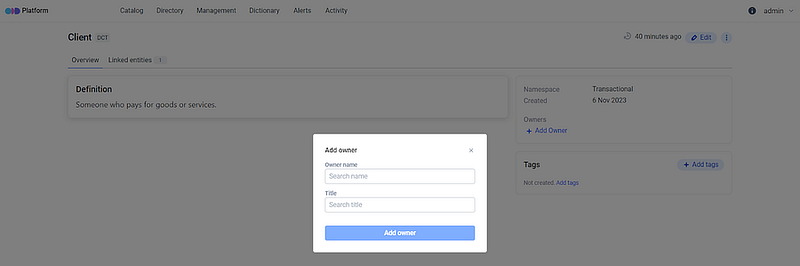
* **Owners** — operators responsible for the term's definition and lifecycle.
* **Tags** — applied via the standard tagging surface; the term's `TERM_TAGS_UPDATE` permission gates this.
* **Links** to other terms (term-to-term) and to data entities (term-to-entity).
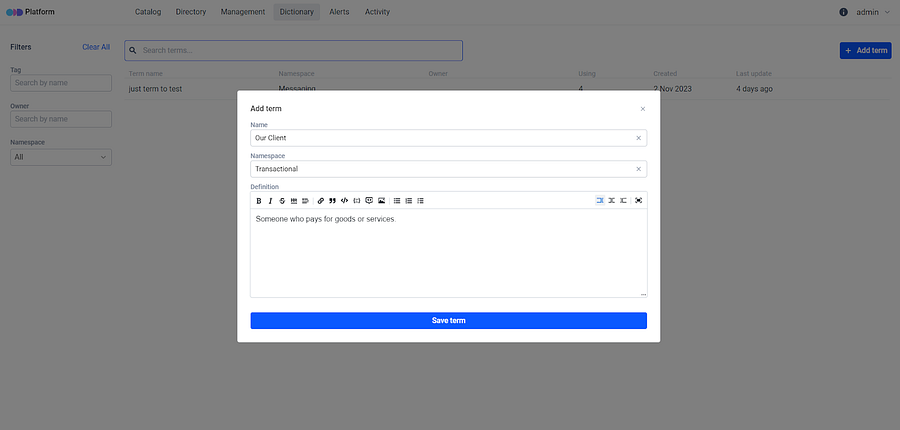
Give extra information about your data entities by creating terms that define these entities or processes related to them. You may see all terms connected to a data entity on its overview page. All created terms are gathered in the **Dictionary** tab.

## The Dictionary tab
The Dictionary tab is the catalog-wide entry point for browsing and curating terms. The tab is implemented as a **server-side faceted-search session** rather than a flat list — opening it for the first time creates a new search session and lands you on a results page with an empty results table until you either type a query, apply a facet filter, or use the platform's term-listing API directly. On a deployment with many terms this avoids paginating thousands of rows up-front, but it does mean a fresh visit shows zero rows even on a populated catalog.
From here you can:
* Type a query or apply a facet to populate the results table.
* Create a new term (gated by `TERM_CREATE`).
* Open a term's detail page to edit its description, manage owners, link to other terms, and review which data entities reference it.
A term's detail page shows the **Overview** (the About-style description), a **TERMS** section listing directly-linked terms, and a reverse-search panel showing every data entity and column that references this term in its description.
The search-session URL (the `/termsearch/{uuid}` path you see in the address bar after a query) is **session-shared** — sharing the URL with a colleague gives them the same session view, including any filters and pagination state, and lets them mutate the session by changing those filters. Treat the URL as a working-view share, not as a deep-link to fixed results.
## Namespace-scoped terms
Terms live within a Namespace and are scoped by it for **identity and authoring** purposes — `finance/Customer` is a distinct term from `marketing/Customer` if both teams want different definitions. The namespace is part of the inline-mention syntax used in description text (see [Term-to-entity associations](#term-to-entity-associations)).
Namespace is **not a read-time isolation boundary** on the term catalogue. Every authenticated user sees every term from every namespace in Dictionary search results, term-detail pages, and the `/api/terms` read endpoints — the namespace field is a payload classifier, not a query predicate, at the term-read layer. Multi-namespace deployments depending on per-namespace read isolation should treat this as a known limitation; the term metadata you author in one namespace is visible to operators authorised on the platform regardless of the namespace they belong to. See [Known operator caveats](#known-operator-caveats) below for the related security caveats around term-link side-channels.
For coordinating terms across teams, use [Namespaces in Management](/features/management.md) as the operator-mutating surface that creates and curates namespaces themselves.
## Ownership and privileges
A term carries **owners** — operators (linked to platform users via [User-owner association](/configuration-and-deployment/enable-security/authorization/user-owner-association.md)) responsible for the term's definition, edits, and lifecycle. The owner holds the authority to create, approve edits, and delete the associated term, contributing to the relevance of those descriptions.
The platform exposes seven `TERM_*` RBAC permissions:
| Permission | Action |
| ----------------------- | ----------------------------------------------------------------------------------------------------------------------------------------------------------------------------------------------------------------------------- |
| `TERM_CREATE` | Create a new term in the Dictionary. |
| `TERM_UPDATE` | Edit the term's name, description, or namespace. (Does **not** gate direct term-to-term links — those endpoints carry no permission; see [Known operator caveats → Security and RBAC bypasses](#security-and-rbac-bypasses).) |
| `TERM_DELETE` | Delete a term from the Dictionary. |
| `TERM_OWNERSHIP_CREATE` | Assign an owner to a term. |
| `TERM_OWNERSHIP_UPDATE` | Update an existing owner's role on a term. |
| `TERM_OWNERSHIP_DELETE` | Remove an owner from a term. |
| `TERM_TAGS_UPDATE` | Apply or remove tags on a term. |
Plus the cross-cutting `TERM_ASSIGNMENT_UPDATED` activity-event marker emitted whenever a term is linked to or unlinked from a data entity.
For the platform-wide permission catalog and how to compose roles around these permissions, see [Permissions](/configuration-and-deployment/enable-security/authorization/permissions.md).
## Term-to-term linking
ODD supports two distinct ways of relating terms in the catalog. Pick the one that fits the relationship you want to express.
**Description-text mentions.** Inline-mention a term inside a data entity's or column's description. The mention surfaces in that entity's **Terms** section once the description is saved. This is the right tool for narrative use — when the term is part of how you explain the entity. The required format and a full walkthrough live in [Term-to-entity associations](#term-to-entity-associations) below.
**Direct term-to-term links.** A term can also be linked directly to other terms — independent of any data entity description. From a term's detail page, the **Overview → TERMS** section exposes an **Add term** action that opens an autocomplete to pick the target term. The link is bi-directionally visible: it appears on both terms' pages and can be removed from either side. Each linked term carries an `isDescriptionLink` flag, so the UI can distinguish links created via inline description mentions from these direct links.
The UI surfaces the **Add term** action alongside the term edit controls, so it appears to follow `TERM_UPDATE` — but the underlying create/remove endpoints carry no RBAC permission and are open to any authenticated user. See [Known operator caveats → Security and RBAC bypasses](#security-and-rbac-bypasses) before relying on `TERM_UPDATE` to gate who can link terms.
The same term-to-term linking is exposed over the platform API — see [API Reference → Glossary → Term-side linkage](/developer-guides/api-reference/glossary.md).
**When to use which.** Reach for description-text mentions when the term naturally belongs in the narrative of an entity (*"This `orders` table records each `Customer Order`."*). Reach for direct term-to-term links when you are curating the glossary itself (*"`Customer` and `Client` mean the same thing in our taxonomy."*) and want the relationship to be visible from either term's page regardless of where it is mentioned.
## Term-to-entity associations
This is the descriptive-information walkthrough — how operators link business terms to specific data entities and columns to give them domain context.
**Adding business terms to the Dictionary.** Initially, it is necessary to add relevant business terms to the platform's Dictionary. These terms can be associated with specific data entities or columns.
The Dictionary Terms section primarily serves to define and provide context for data entities. For instance, if a data asset relates to "Customer Analytics", the associated business term can signify its alignment with the customer analytics domain.
**Ownership and privileges.** An essential part of this feature is the capacity to designate an owner for a business term. This owner holds the authority to create, approve edits, and delete the associated entity, contributing to the relevance of those descriptions.
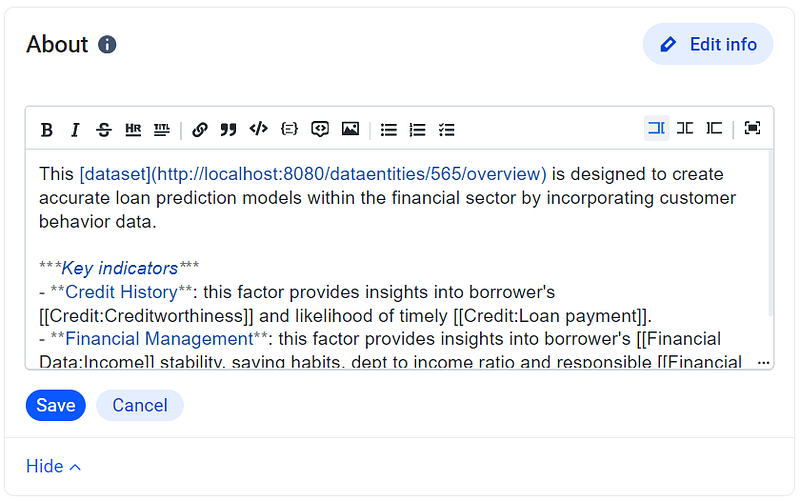
**An About feature inspired by Wikipedia.** The central concept behind the development of this feature draws inspiration from the user-friendly functionality found on Wikipedia — an **About** section.
As soon as the term is introduced into the dictionary, users can navigate to the **About** section and craft a concise term description using a rich formatting toolbar.
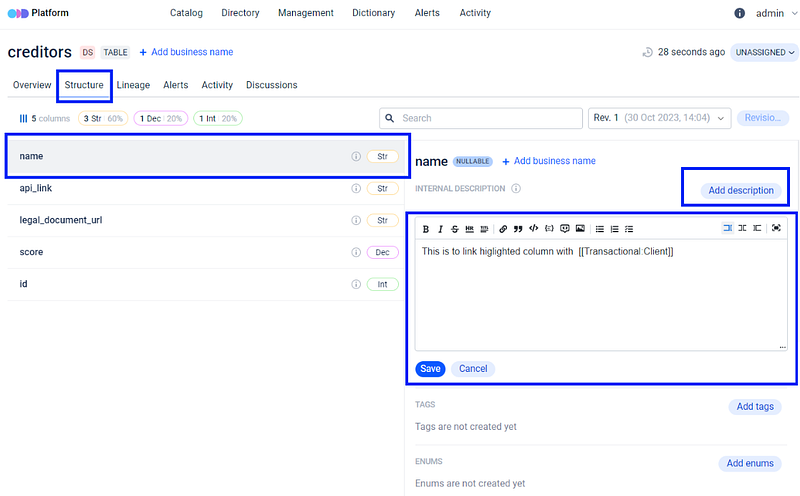
**Linking and describing terms.** The terms mentioned in description text can then be linked to the previously established business term, using the required format for linking. When users hover the cursor over an information icon, it triggers the highlighting effect, illuminating the text **format** that should be used to link the text to a specified term.
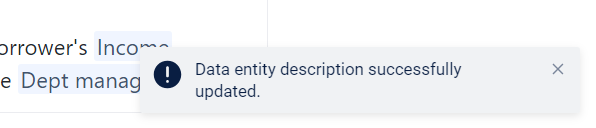
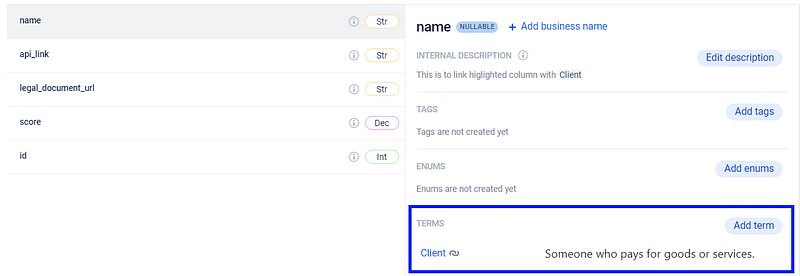
**Updated Dictionary Terms section.** Once created and saved, the business term becomes accessible in the Dictionary Terms section. Successful creation of the link will be indicated by a notification in the bottom right corner of the screen.
Before linking terms, it is essential to have previously created them and established a corresponding Namespace in the Dictionary. Adhere to the specified formatting requirements and be mindful of spaces. If the term or Namespace is not defined in the Dictionary, a notification will appear around the About section.
**The identical feature for columns.** Users are able to associate terms not only with the dataset as a whole but also with the individual columns. To try it, the user may go to the **Structure** section, choose the desired **Column**, or proceed with the automatically selected one and provide a description in the same manner as described earlier.
After saving the description and associating it with the relevant term, the linked term will appear directly below in the Terms section.
This feature provides users with a convenient way to reach all the business terms available on the platform.
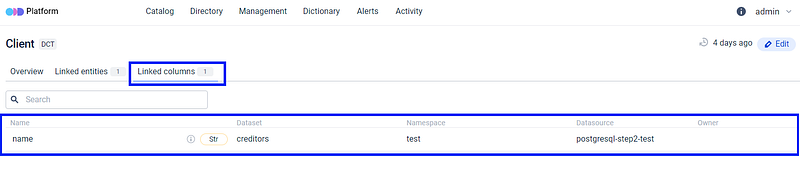
**Reverse search functionality.** It is important to note that connecting items to data entities enables a reverse search capability. Users can easily verify which entities and columns have previously been linked to a specific term.
If the user clicks on the term, a window containing the relevant information will be displayed.
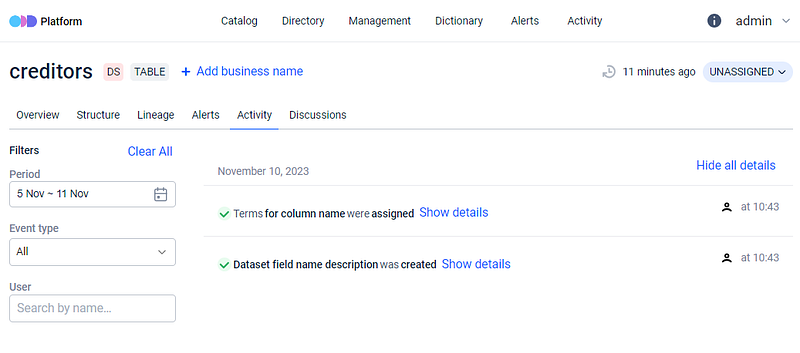
**Activity audit trail.** The history of numerous actions within the platform is accessible in the [Activity Feed](/features/active-platform-features/activity-feed.md), including the creation and linking of terms (the `TERM_ASSIGNMENT_UPDATED` event).
## Known operator caveats
The Business Glossary carries several platform-side defaults that surprise operators authoring deployment-time RBAC policies or compliance-grade audit procedures. Each item below names what an operator might assume, what the platform actually does, and what to do about it today. Caveats are grouped by category so operators auditing security posture can find the relevant items quickly.
### Security and RBAC bypasses
{% hint style="danger" %}
**Term-link and term-unlink operations are not currently gated by `DATA_ENTITY_ADD_TERM` / `DATA_ENTITY_DELETE_TERM`.** The platform's security-rule registry registers the gate against the path `/api/dataentities/{id}/term` (singular), but the actual endpoint exposed by the OpenAPI contract is `/api/dataentities/{id}/terms` (plural). The path-matcher never fires, and the requests fall through to the global "any authenticated user" rule. **Any authenticated user under `LOGIN_FORM`, `OAUTH2`, or `LDAP` can link or unlink any term to any data entity** regardless of the Policy grants the operator has authored for these two permissions. If separation-of-duties on term-to-entity linkage matters to your deployment, do not rely on `DATA_ENTITY_ADD_TERM` / `DATA_ENTITY_DELETE_TERM` until the platform-side path-rename fix lands.
Note that renaming the security-rule path alone would not fully close this gap: the service-layer methods that perform the link and unlink (`linkTermWithDataEntity`, `removeTermFromDataEntity`, `linkTermWithDatasetField`, `removeTermFromDatasetField`, `linkTermWithTerm`, `removeTermToLinkedTermRelation`) carry no permission check of their own — the only authorization is the controller-path rule. Treat term linkage as reachable by any authenticated user until both the path and a service-tier check are in place.
{% endhint %}
{% hint style="danger" %}
**Direct term-to-term links are not gated by `TERM_UPDATE` — or by any permission.** The **Add term** action on a term's **Overview → TERMS** panel calls `POST /api/terms/{term_id}/term` (and the matching `DELETE` to unlink). Unlike the term-edit endpoints, these two paths have no entry in the platform's security-rule registry at all, so they fall through to the global "any authenticated user" rule. **Any authenticated user can create or remove a direct term-to-term link regardless of whether you granted them `TERM_UPDATE`.** The UI placement next to the term-edit controls makes the action look `TERM_UPDATE`-gated, but it is not. Do not rely on `TERM_UPDATE` to control who can curate the term-to-term graph until the platform registers a permission for these paths.
{% endhint %}
{% hint style="warning" %}
**Editing an entity description with `[[namespace:term]]` mentions writes term-to-entity link rows without consulting `DATA_ENTITY_ADD_TERM`.** The auto-link side-channel materialises links as the description saves; the operator who edits the description does not need term-link permission to attach the term. Granting `DATA_ENTITY_DESCRIPTION_UPDATE` therefore implicitly grants term-link capability. Operators authoring separation-of-duties policies cannot use the two permissions as independent grants today.
{% endhint %}
{% hint style="warning" %}
**Creating a new term silently writes term-to-entity links for every pre-existing entity description that already mentioned the term by name.** The platform maintains two staging tables for `[[namespace:term]]` mentions that referenced a term that did not yet exist; the moment the term is created, the staging tables drain and the auto-links are written. These cross-time auto-links are recorded under the description author's historical context — not the term-creator's — and the only Activity Feed event surfaced is the `TERM_CREATED` of the new term. Compliance reconstructions of "who linked term X to entity Y at time T" cannot be answered from platform logs for entities linked through this drain. Operators authoring popular term names (`Customer`, `Order`, `PII`) should expect a significant burst of auto-links to materialise the moment the term is created.
{% endhint %}
{% hint style="warning" %}
**Typing a novel namespace name in the Term create / edit dialog creates a new namespace on submit — without consulting `NAMESPACE_CREATE`.** The dialog's namespace autocomplete accepts free-text input; on submit, the platform's namespace service auto-creates the namespace row on the requester's behalf. Operators granted `TERM_CREATE` but explicitly **not** `NAMESPACE_CREATE` (a separation-of-duties posture) can still mint namespaces this way. Track the namespace directory growth as part of your operator-hygiene cadence.
{% endhint %}
{% hint style="warning" %}
**Typing a novel tag name in the Term tags edit dialog creates a new tag on submit — without consulting `TAG_CREATE`.** Same shape as the namespace bypass above: operators with `TERM_TAGS_UPDATE` (but without `TAG_CREATE`) can mint tags through this dialog. The tag directory accretes silently. The `Management → Tags` surface remains the operator-curation tab, but it does not gate the side-channel creation path described here.
{% endhint %}
{% hint style="danger" %}
**The term-definition Markdown editor accepts raw HTML and inline JavaScript with no client-side sanitisation.** The Term create / edit dialog's definition field persists the Markdown body verbatim through the platform; the render side does not strip HTML / script payloads before mounting. Any operator with `TERM_UPDATE` permission can plant `