# Data Entity Statuses

Every catalogued entity carries a **status** that signals where it is in its lifecycle — newly ingested, in active use, deprecated for a planned removal, or soft-deleted pending permanent purge. The status is operator-set, surfaces on the Catalog page as a [Search facet](/features/data-discovery/search.md), and drives the [Activity Feed](/features/active-platform-features/activity-feed.md)'s `DATA_ENTITY_STATUS_UPDATED` event.

## The five statuses

| Status           | Meaning                                                                                                                                                                                               | Set by                                                                                         |
| ---------------- | ----------------------------------------------------------------------------------------------------------------------------------------------------------------------------------------------------- | ---------------------------------------------------------------------------------------------- |
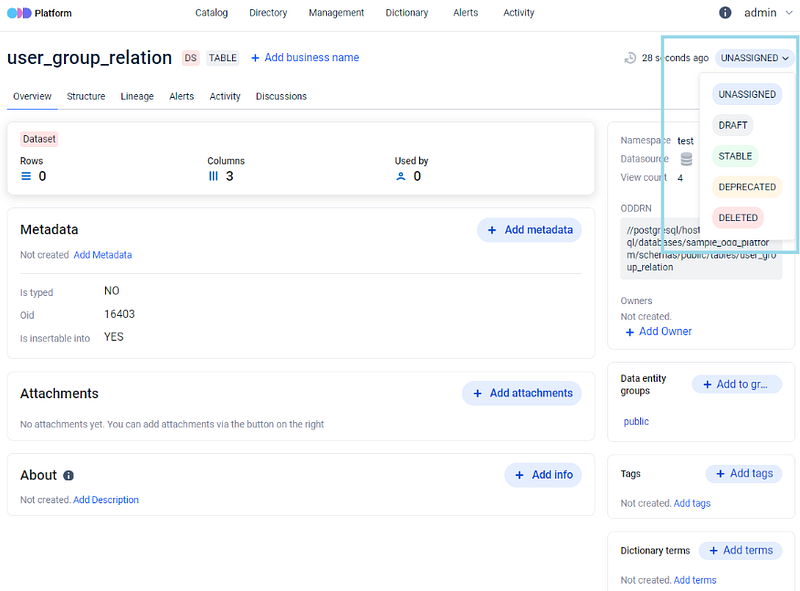
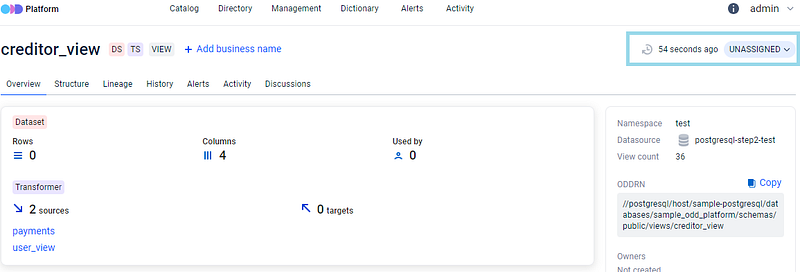
| **`UNASSIGNED`** | The default. When metadata collectors ingest data entities into the platform's database, every new entity lands as `UNASSIGNED` until an operator changes it.                                         | Platform default; can be operator-overridden via the entity detail page.                       |
| **`DRAFT`**      | The data entity is a draft / test entity in the data source — not yet ready for downstream consumption. The UI lets operators set a time period after which the status auto-transitions to `DELETED`. | Operator.                                                                                      |
| **`STABLE`**     | The data entity is stable and fully operational — safe for downstream pipelines and BI reports.                                                                                                       | Operator.                                                                                      |
| **`DEPRECATED`** | A warning marker — the entity is deprecated for planned removal. The UI lets operators set a time period after which the status auto-transitions to `DELETED`.                                        | Operator.                                                                                      |
| **`DELETED`**    | Soft-deleted. The entity is hidden from the [Management → Datasources](/features/management.md) view by default and only reachable through filter-with-deleted-items.                                 | Operator (manual) or auto-transition from `DRAFT` / `DEPRECATED` after the TTL window expires. |

<figure><img src="/files/3bGKHbPLaPTOKTYmRUBv" alt=""><figcaption><p>Default status on newly-ingested entities</p></figcaption></figure>

<figure><img src="/files/cK3dcL7bJIf8BJbCdkxK" alt=""><figcaption><p>Operator changes the status from the entity detail page</p></figcaption></figure>

## The soft-delete TTL

`DELETED` is **soft delete**. The platform's housekeeping job permanently deletes a `DELETED` entity (and every cascading row attached to it — metadata values, ownerships, lineage, tags, terms, alerts, messages, metrics, attachments, task runs, group relations, and dataset structure / enum values for datasets) only after the entity's status-update timestamp is older than `housekeeping.ttl.data_entity_delete_days`. The default window is **30 days**.

During the soft-delete window the operator can flip the status back (`DELETED` → `STABLE` or any non-deleted status) and the entity reappears in the catalog with its history intact. After the TTL expires the next housekeeping run hard-deletes the row; once that happens, recovery requires re-ingest from the source.

To change the retention window, see [Housekeeping Settings Configuration → `housekeeping.ttl.data_entity_delete_days`](/configuration-and-deployment/odd-platform.md#housekeeping-settings-configuration). Raise the value before any planned bulk deprecation if the audit trail matters for compliance.

## Status changes propagate to data sources

If the status of a data entity **and its parent data source** are both set to `DELETED` and an operator then flips the entity status back to a visible state, the data source itself reverts to its original (non-deleted) condition. The platform mirrors entity-level status changes back up the data-source row when the two are in lockstep.

## Group statuses

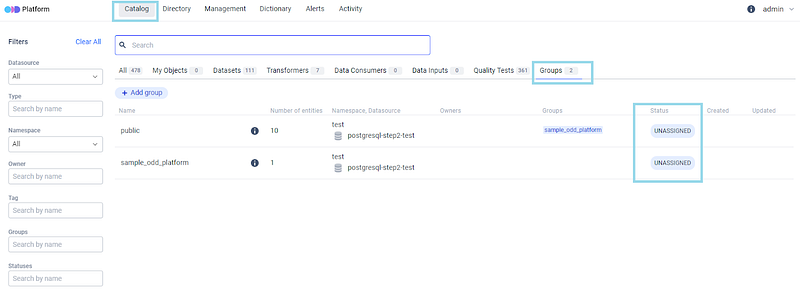
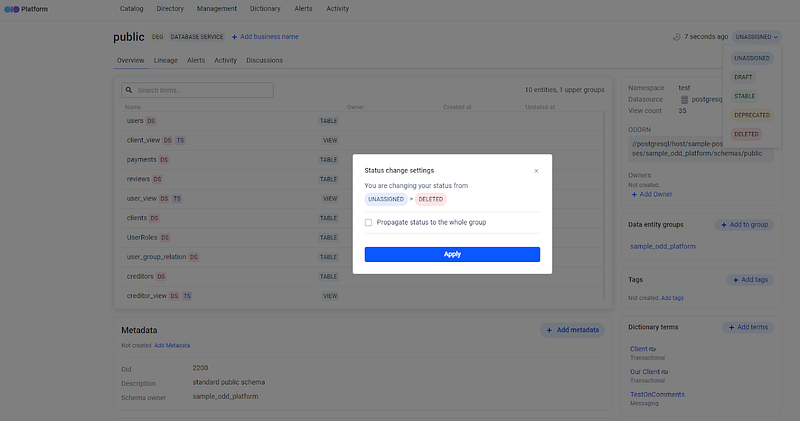
Status assignments apply to entity **groups** as well as individual entities. When an operator changes a status on a [Data Entity Group](/features/data-discovery/groups-domains.md), the UI offers the option to apply the change to the group as a whole or to cascade it to every member entity. Use the group-level status when you want to deprecate or retire an entire pipeline; use member-level when only specific members are affected.

<figure><img src="/files/cjbJEeNDBLnqhxptOO5d" alt=""><figcaption><p>Group-level status assignment</p></figcaption></figure>

<figure><img src="/files/0kzAUe9FER4UEoE3JhsS" alt=""><figcaption><p>Apply-to-group vs apply-to-members confirmation</p></figcaption></figure>

## Where the status surfaces

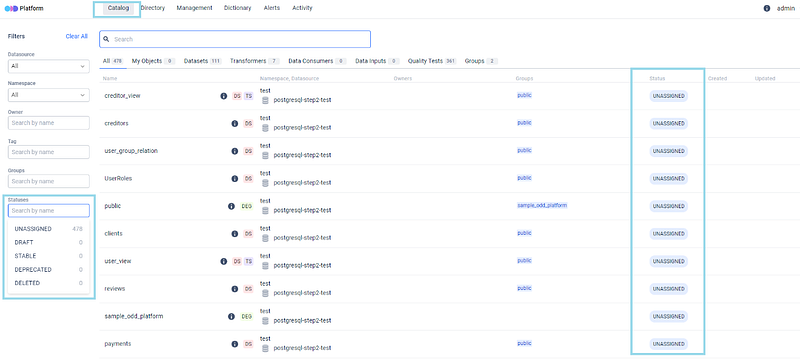
* **Catalog page filter** — Statuses is one of the seven [Search facets](/features/data-discovery/search.md). Selecting one or more statuses narrows the result set to entities matching any of them.

  <figure><img src="/files/3hP396kAZhrciCls7g70" alt=""><figcaption><p>Statuses facet on the Catalog page</p></figcaption></figure>
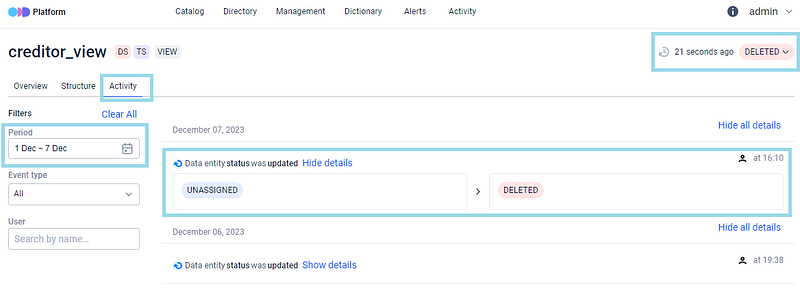
* [**Activity Feed**](/features/active-platform-features/activity-feed.md) — every status change emits a `DATA_ENTITY_STATUS_UPDATED` event. The feed is the audit trail for who set what status and when.

  <figure><img src="/files/0xefzIemJLcACeX9zfp1" alt=""><figcaption><p>Status-update event on the Activity feed</p></figcaption></figure>
* **Entity detail page** — the current status is shown next to the entity name, with edit affordance gated by the `DATA_ENTITY_STATUS_UPDATE` permission (see [Permissions](/configuration-and-deployment/enable-security/authorization/permissions.md)).

## RBAC

Operators need the `DATA_ENTITY_STATUS_UPDATE` permission to change a data entity's status. The permission is part of the Data entity permissions group; see [Permissions](/configuration-and-deployment/enable-security/authorization/permissions.md) for the full list and how to compose roles around it.

## Where to next

* [Search and Filtering](/features/data-discovery/search.md) — the Statuses facet that surfaces these on the Catalog page.
* [Activity Feed](/features/active-platform-features/activity-feed.md) — the audit trail of every status change (`DATA_ENTITY_STATUS_UPDATED`).
* [Data Entity Groups & Domains](/features/data-discovery/groups-domains.md) — the group-vs-member status apply-to choice.
* [Housekeeping Settings Configuration](/configuration-and-deployment/odd-platform.md#housekeeping-settings-configuration) — the soft-delete TTL operator-side reference.
* [Permissions](/configuration-and-deployment/enable-security/authorization/permissions.md) — the `DATA_ENTITY_STATUS_UPDATE` permission.
* [Data Discovery overview](/features/data-discovery.md) — the bucket landing this page sits under.


---

# Agent Instructions: Querying This Documentation

If you need additional information that is not directly available in this page, you can query the documentation dynamically by asking a question.

Perform an HTTP GET request on the current page URL with the `ask` query parameter:

```
GET https://docs.opendatadiscovery.org/features/data-discovery/statuses.md?ask=<question>
```

The question should be specific, self-contained, and written in natural language.
The response will contain a direct answer to the question and relevant excerpts and sources from the documentation.

Use this mechanism when the answer is not explicitly present in the current page, you need clarification or additional context, or you want to retrieve related documentation sections.