> For the complete documentation index, see [llms.txt](https://docs.opendatadiscovery.org/llms.txt). Markdown versions of documentation pages are available by appending `.md` to page URLs; this page is available as [Markdown](https://docs.opendatadiscovery.org/features/data-discovery/metadata-stale.md).
# Metadata stale
Per-entity orange icon shown when an entity has not been re-ingested for longer than \`odd.data-entity-stale-period\` (default 7 days) — signals possible collector or source-side issues.
ODD's catalog reflects the most recently ingested view of every source system. If a collector pauses, fails, or its source goes offline, the metadata for affected entities **goes stale** — the catalog row continues to render, but its ground-truth-on-the-source state is no longer guaranteed. The platform surfaces this with a per-entity **stale indicator** so users can distinguish "actively-maintained metadata" from "metadata of uncertain freshness".
## How the indicator surfaces
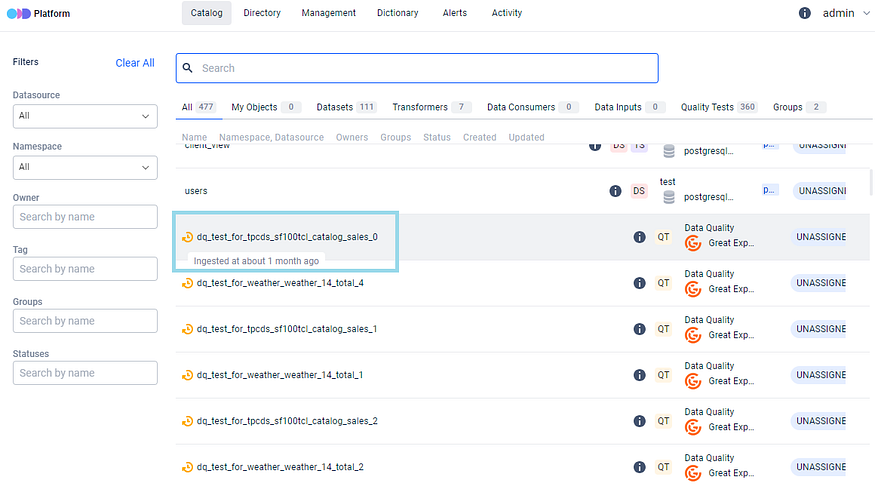
Stale entities are marked with an orange clock icon next to the entity name. Hovering the icon reveals the **last refresh timestamp** — the moment the platform last received an ingest for this entity.
Stale icon and last-refresh tooltip on a catalog entity
The same indicator surfaces on:
* The [Catalog Overview](/features/data-discovery/catalog-overview.md) → Recommended panel tiles.
* [Search](/features/data-discovery/search.md) result rows.
* The [Directory](/features/data-discovery/directory.md)'s level-4 entity list.
* The entity's own detail page.
Wherever the entity name appears in the catalog, the stale icon appears next to it once the staleness window elapses.
## The freshness window
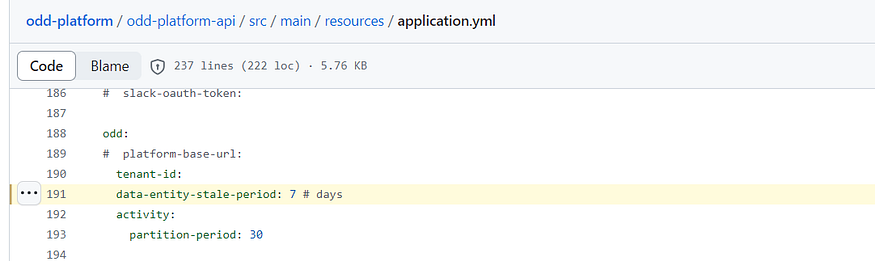
The platform considers an entity stale when its last successful ingestion is older than `odd.data-entity-stale-period` (integer; days; **default `7`**).
Default stale period in the platform configuration
Operators running collectors on cadences longer than the stale window should raise the value to match — otherwise every entity from a slow-cadence collector flips to stale between scheduled runs even though the collector is healthy. The reference for tuning the value lives at [Configure ODD Platform → Detecting stale metadata](/configuration-and-deployment/odd-platform.md#detecting-stale-metadata).
## What the indicator does (and doesn't) signal
The stale icon means **"the catalog has not received an ingest for this entity within the configured window"**. It does not by itself diagnose **why**. Common causes:
* The collector is paused or stopped.
* The collector is running but the adapter is failing on this source.
* The source itself is unreachable (network, credentials, deletion).
* The collector's cadence is longer than the stale window (raise the window, or shorten the cadence).
* A specific entity was excluded by an [ingestion filter](/integrations/integrations.md) and is no longer reported even though peers are.
A stale icon is a discovery-time prompt — *"check whether this is still trustworthy"* — not a runtime alert. For platform-detected runtime issues (failed jobs, failed quality tests, schema-incompatible changes), see [Alerting](/features/active-platform-features/alerting.md).
## Known limitations and operator caveats
The stale-detection predicate is a single backend check (`last_ingested_at + odd.data-entity-stale-period < now()`) rendered through a single UI widget that returns `null` when an entity is fresh. Five operator-visible behaviours follow from that shape — each one needs to be on every operator's checklist before relying on staleness as a collector-health signal.
{% hint style="danger" %}
**Silent-default footgun: verify `odd.data-entity-stale-period` is present in your deployment overlay.**
The shipped `application.yml` sets the key to `7` days, but the value is bound with no startup validation. If your Helm values, Docker `environment:` block, Kubernetes ConfigMap, or any other overlay tool **removes or empties the line**, the platform resolves the value to `null`. The predicate then returns `false` for every entity in the catalog — no stale icons anywhere, no startup log, no admin warning, no diagnostic banner. The platform looks healthy; collectors could be hours, days, or weeks behind and no signal surfaces.
Treat `odd.data-entity-stale-period` as a **required** configuration key, not an overridable default. After every deployment change touching the platform config, confirm the resolved value in your environment (for example: hit any entity detail page and check whether stale entities elsewhere still render their icons; or read the rendered value off your overlay artefact). The doc-side caveat is the only signal until an explicit startup validator lands.
{% endhint %}
### "No stale icon" does not mean "freshly ingested"
The predicate's first condition is `last_ingested_at IS NOT NULL`. An entity that has never been ingested — manually created in the UI, pending its first collector pull, or skipped by the collector on its first run — has a NULL `last_ingested_at` and therefore reports `is_stale: false`. The UI shows the same absence of icon for "ingested twenty minutes ago" and "never ingested at all"; you cannot distinguish the two from the catalog page alone.
When building dashboards or SLA reports on top of staleness, do not treat absence-of-stale as evidence of recency. Enumerate never-ingested entities separately (e.g. `WHERE last_ingested_at IS NULL` in PostgreSQL) and treat that set as its own freshness category.
### A globally-dead signal is visually indistinguishable from a fully-healthy platform
The stale widget renders the orange icon only when `is_stale=true`; in every other case it renders nothing — no DOM, no whitespace. Combined with the silent-default footgun above, a deployment that has accidentally unset the stale period shows zero stale icons across every list, detail page, and lineage view — looking exactly like a deployment where every collector is hitting its cadence perfectly.
Monitor the count of stale entities outside the UI (`SELECT COUNT(*) FROM data_entity WHERE last_ingested_at + interval '7 days' < now()` or similar against your actual configured period). A flat-line at zero where you previously saw a non-zero baseline is the operator-visible signature of a silent-disable; an unexpected non-zero is a real-time collector incident.
### One global cadence — no per-data-source or per-namespace override
`odd.data-entity-stale-period` is a single deployment-wide integer. There is no per-data-source `stale_period_days` column, no per-namespace override, no per-class default. A deployment that mixes high-cadence sources (a streaming Kafka topic ingested hourly) with low-cadence ones (weekly dbt model snapshots) faces an impossible single-value choice — a 7-day window flags the streaming topic every pause it takes; a 1-hour window flags the weekly dbt models as permanently stale.
The supported posture today is the single global cadence. When you have heterogeneous sources, the recommended compromise is to set the threshold to the **most conservative source's window** (so high-cadence sources flip stale promptly while low-cadence sources keep flipping back and forth) or to accept the flag-noise from the slow sources. Both have trade-offs; neither is a workaround for the missing per-source knob.
### Multi-replica deployments can render the stale icon inconsistently due to clock skew
The stale-detection predicate compares `last_ingested_at + odd.data-entity-stale-period` against `now()` evaluated on the **rendering replica**. Each ODD Platform replica calls its own JVM clock; if the platform runs on multiple pods / nodes whose system times are not strictly NTP-synchronised, two replicas evaluating the same entity at the same wall-clock moment can land on opposite sides of the cutoff. The result is a visual flicker on the catalog UI — an operator refreshing the page on a load-balanced deployment may see the orange icon appear, disappear, and reappear within seconds as their requests round-robin across replicas at the boundary.
This is a low-impact edge case (most production deployments run with sub-second NTP skew, well inside the 7-day default cutoff, so flicker is rarely visible). It becomes operator-observable when the deployment has either set an unusually short `odd.data-entity-stale-period` (hours rather than days) or runs on infrastructure where clock skew is measured in seconds rather than milliseconds. If you see the flicker, audit the replicas' clocks — `kubectl exec` into each pod and compare `date` output, or check your container runtime's clock-sync policy.
### `last_ingested_at` is trust-on-write — the freshness signal is forgeable
The predicate operates on whatever value sits in `last_ingested_at` at read time, without checking whether the writer is the legitimate collector for that source. Any actor with ingestion-write capability against a data source — a collector token, a server-to-server API key, a push-adapter credential — can emit an event with a current timestamp for any entity in that source and the entity will report `is_stale: false`.
This is the read-collaborative posture's write-side mirror: the catalog trusts ingestion writes by design, and the stale signal inherits that trust. For collector-health monitoring, treat the staleness signal as a **freshness lower bound, not an authenticity proof** — combine it with collector-side cron monitoring or job-run alerts so you have an independent signal of whether the source actually produced new data, not just whether something wrote a new timestamp.
## Where to next
* [Configure ODD Platform → Detecting stale metadata](/configuration-and-deployment/odd-platform.md#detecting-stale-metadata) — the operator-side reference for `odd.data-entity-stale-period`.
* [Catalog Overview page → Recommended panel](/features/data-discovery/catalog-overview.md#recommended) — where stale tiles surface explicitly with the orange icon.
* [Data entity detail page](/features/data-discovery/entity-detail-page.md) — the per-entity surface where the stale icon and the relative-time tooltip appear in the header.
* [Alerting](/features/active-platform-features/alerting.md) — the platform's runtime alert surface for failures (distinct from staleness, which is a freshness signal).
* [Data Discovery overview](/features/data-discovery.md) — the bucket landing this page sits under.