> For the complete documentation index, see [llms.txt](https://docs.opendatadiscovery.org/llms.txt). Markdown versions of documentation pages are available by appending `.md` to page URLs; this page is available as [Markdown](https://docs.opendatadiscovery.org/features/data-discovery/business-names.md).
# Business names
Business names for data entities and dataset fields — operator-assigned alternative names that surface alongside the original technical names everywhere the entity is rendered.
Datasets and dataset fields ingested from a source system carry their **technical names** (`fct_orders_v2`, `cust_id_pk`, `txn_dt`) — names chosen by whoever built the source schema, often unfit for the cross-team operator and analyst audience that consumes the catalog. ODD lets operators assign **business names** alongside the technical name: an alternative human-readable label that surfaces everywhere the entity is shown, while the original technical name persists below as a reference wherever the entity carries one.
The technical name stays as-is in lineage edges, ODDRNs, and the underlying source — the business name is purely a presentation-layer alias on the catalog surface.
## Setting a business name on a data entity
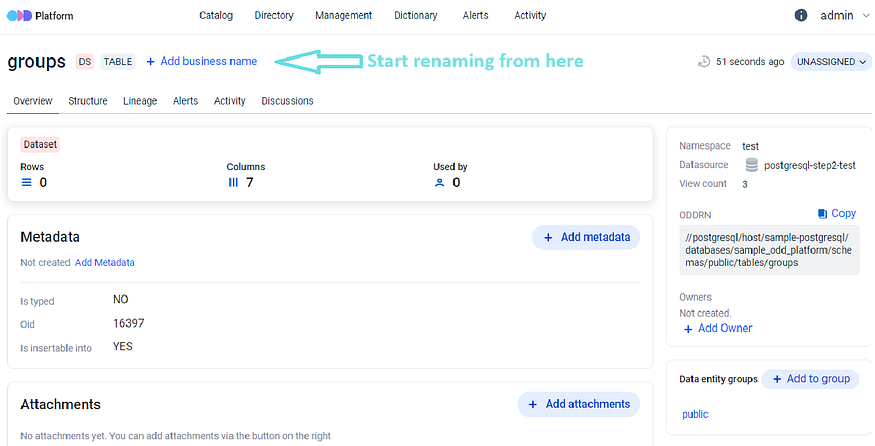
**Step 1.** On any data entity's detail page, click the **Add Business Name** button.
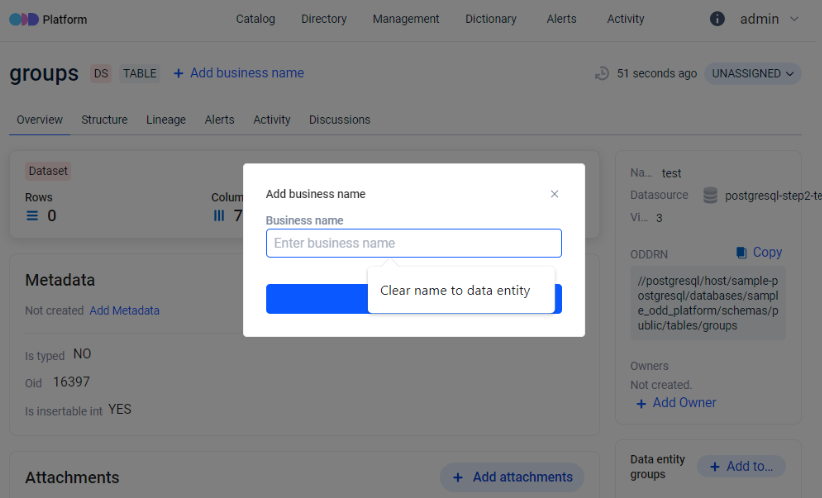
**Step 2.** Enter the preferred name in the **Business Name** field and confirm.
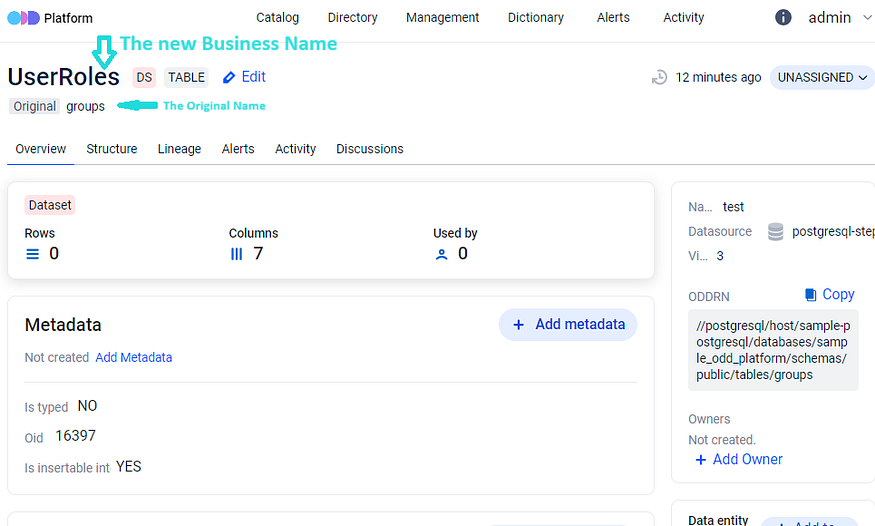
**Step 3.** The newly-assigned business name renders prominently as the entity's display name. When the entity also carries a source-ingested technical name, that original name persists below the new name as an inline reference, so anyone looking at the entity can see both. A manually-created entity has no separate technical name, so it shows only the business name with no `Original` line beneath it.
{% hint style="info" %}
**The Add / Edit business-name button is hidden on entities whose status is `DELETED`.** When an entity is in the `DELETED` status the entity-level business-name affordance disappears entirely — there is no disabled-button state and no banner explaining why it is gone. An operator who expects to rename a deleted entity simply sees no button. Restore the entity to a non-deleted status to regain the affordance.
{% endhint %}
## Setting a business name on a dataset field (column)
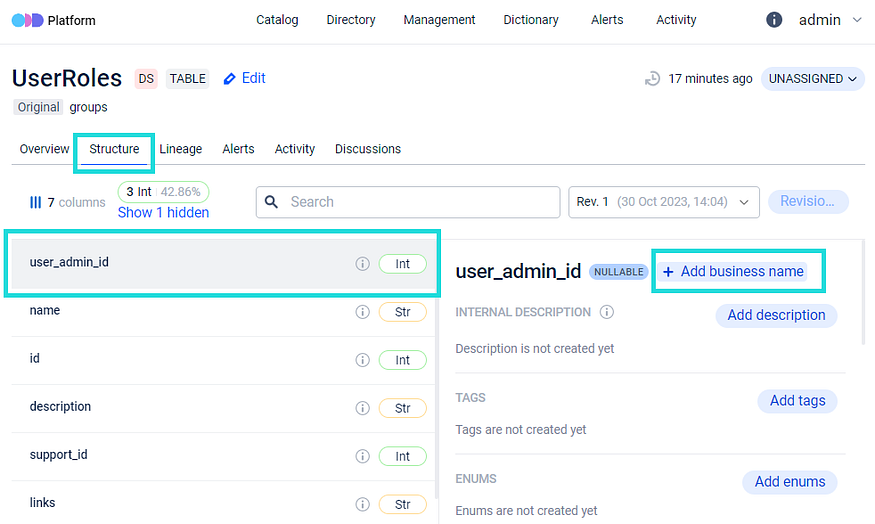
The same workflow applies at the column level. Open the dataset's **Structure** tab, find the column to rename, and follow the same Add Business Name flow:
The dataset's Structure tab renders the business name as the primary column label and the technical name as a secondary line — same pattern as the entity-level rename.
## Where business names appear
Once set, the business name is the primary display label everywhere the entity (or the field) is rendered:
* On the entity's own detail page (Overview, Structure, Lineage, Test reports, Alerts, Query Examples, Activity, Discussions tabs).
* In [Search](/features/data-discovery/search.md) result rows and the per-entity tile on the [Catalog Overview](/features/data-discovery/catalog-overview.md).
* In the [Directory](/features/data-discovery/directory.md) drill-down (level-4 entity list).
* In lineage graphs (per-node label).
* In any catalog surface that renders the entity name.
The technical name is preserved underneath for any entity that carries one (a manually-created entity has no separate technical name to show) — operators looking for an entity by either name can find it; analysts reading the catalog see the friendlier label.
## RBAC
Setting a business name on a data entity is gated by `DATA_ENTITY_INTERNAL_NAME_UPDATE` and records a `BUSINESS_NAME_UPDATED` event on the [Activity Feed](/features/active-platform-features/activity-feed.md). Setting a business name on a dataset field (a column) is gated by `DATASET_FIELD_INTERNAL_NAME_UPDATE` and records a **`DATASET_FIELD_INTERNAL_NAME_UPDATED`** event — a different event type. An operator filtering the Activity Feed by `BUSINESS_NAME_UPDATED` alone sees entity renames but silently misses every column rename; filter on both event types to audit all business-name changes.
For the full permission list, see [Permissions](/configuration-and-deployment/enable-security/authorization/permissions.md).
## Where to next
* [Data entity detail page](/features/data-discovery/entity-detail-page.md) — the per-entity surface where the business-name affordance lives in the detail-page header.
* [Activity Feed](/features/active-platform-features/activity-feed.md) — the audit trail of business-name changes: `BUSINESS_NAME_UPDATED` (entity) and `DATASET_FIELD_INTERNAL_NAME_UPDATED` (column).
* [Permissions](/configuration-and-deployment/enable-security/authorization/permissions.md) — `DATA_ENTITY_INTERNAL_NAME_UPDATE` + `DATASET_FIELD_INTERNAL_NAME_UPDATE`.
* [Search and Filtering](/features/data-discovery/search.md) — where renamed entities surface (search matches against both the technical name and the business name).
* [Data Discovery overview](/features/data-discovery.md) — the bucket landing this page sits under.