> For the complete documentation index, see [llms.txt](https://docs.opendatadiscovery.org/llms.txt). Markdown versions of documentation pages are available by appending `.md` to page URLs; this page is available as [Markdown](https://docs.opendatadiscovery.org/features/active-platform-features/notifications.md).
# Notifications
How alerts move in and out of ODD Platform — outbound through Slack incoming webhook, generic webhook, or SMTP email; inbound from Prometheus AlertManager as Distribution Anomaly alerts.
Notifications is the subsystem that moves alerts **across the platform's boundary** — out, through Slack, generic webhook, or SMTP email; or **in**, from a Prometheus AlertManager pushing distribution-anomaly events through the inbound webhook. Alerts the platform raises internally are described under [Alerting](/features/active-platform-features/alerting.md); this page is about the channels that connect those alerts to the rest of an operator's stack.
The subsystem is **disabled out of the box** — the outbound dispatcher needs `notifications.enabled=true` plus a configured PostgreSQL [logical-replication slot](/configuration-and-deployment/odd-platform.md#postgresql-configuration), and the inbound AlertManager webhook is gated by network reachability and, from 0.29.0, by `auth.ingestion.filter.enabled` (off by default). Each channel is independently configurable; deployments use whatever subset matches their on-call workflow.
For setup steps and the full key list, see [Configure ODD Platform → Enable Alert Notifications](/configuration-and-deployment/odd-platform.md#enable-alert-notifications) and [Configure ODD Platform → Prometheus AlertManager Integration](/configuration-and-deployment/odd-platform.md#prometheus-alertmanager-integration). This page is the user-facing description of what each channel does, what it carries, and what to know before enabling it.
## What an outbound notification carries
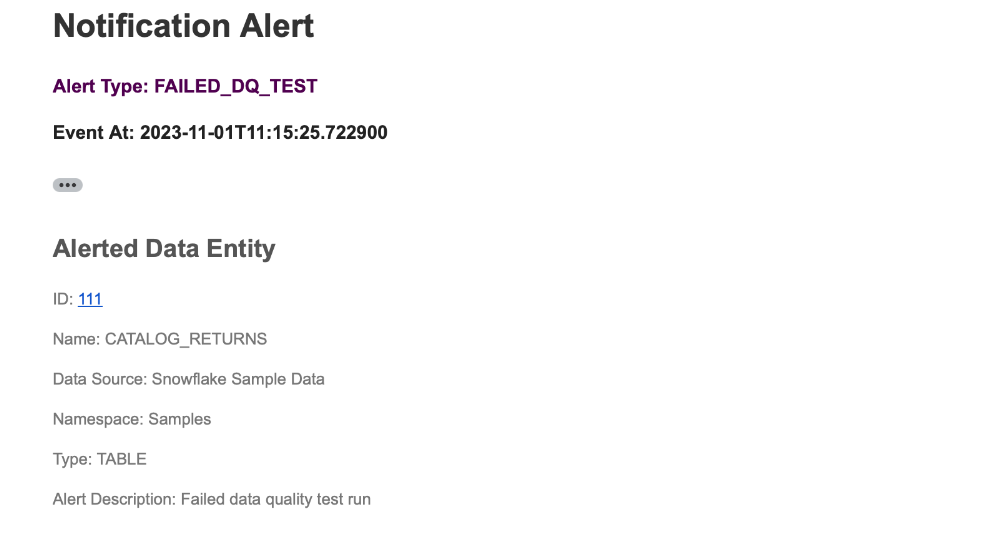
Every alert dispatched out of the platform carries:
1. The name of the entity the alert was raised on.
2. The data source and namespace of that entity.
3. The owners attached to that entity (see [Owners](/configuration-and-deployment/enable-security/authorization/owners.md)).
4. Affected downstream entities — the lineage neighbours within `notifications.message.downstream-entities-depth` levels (default `1`).
{% hint style="warning" %}
**`notifications.message.downstream-entities-depth` has no built-in fallback — omitting it from an externalized config fails startup.** The default of `1` ships in the platform's bundled `application.yml`, but the code that reads the key has **no in-code default**. If you supply your own externalized configuration (a mounted `application.yml`, a config map, environment-variable overrides) that turns notifications on without also setting this key, the platform does **not** fall back to `1` — it fails to start with a Spring "Could not resolve placeholder" error. Whenever you set `notifications.enabled=true` in an override config, set `notifications.message.downstream-entities-depth` alongside it.
{% endhint %}
Clickable links inside notification messages resolve back to the platform UI using the operator-set `odd.platform-base-url` — both the Slack and email senders consume that key. The generic webhook receiver does **not** consume `odd.platform-base-url`; it gets the full alert payload directly and is expected to construct any URLs it needs from that payload.
## Outbound channels
The platform supports three outbound channels. They can be enabled together or individually; an alert dispatched to multiple channels is delivered to every channel that is enabled.
### Slack incoming webhook
The platform POSTs a formatted alert message to a [Slack incoming webhook](https://docs.slack.dev/messaging/sending-messages-using-incoming-webhooks) URL. This is **outgoing-only** — there is no thread state, no reply ingestion, no per-channel routing logic; the platform writes one message per alert dispatch.
Configured by `notifications.receivers.slack.url`. The same Slack workspace can also host the bidirectional [Data Collaboration](/features/active-platform-features/data-collaboration.md) Slack app — the two integrations use different Slack mechanisms (incoming webhook vs OAuth + Events API) and are configured independently.
{% hint style="info" %}
**This is the alert webhook, not the Discussions Slack app.** The alerting Slack integration is a one-way `notifications.receivers.slack.url` POST — no replies, no thread state. The full Slack app used by [Data Collaboration](/features/active-platform-features/data-collaboration.md) is a separate integration via OAuth (`datacollaboration.slack-oauth-token`) and the [Slack Events API](https://docs.slack.dev/apis/events-api/). Each is configured separately; enabling one does not enable the other. See [Main Concepts → Terms & Aliases](/introduction/main-concepts.md#terms-and-aliases) for the side-by-side comparison.
{% endhint %}
{% hint style="warning" %}
**An alert burst can silently lose most Slack messages — the sender does not honour Slack's rate limit.** Slack throttles incoming webhooks (roughly one message per second per webhook) and returns HTTP 429 with a `Retry-After` header when you exceed it. ODD Platform's sender treats every response other than `200 OK` as the same generic failure: it does not read the status code class, does not read `Retry-After`, does not wait, and does not retry. A 429 is logged and the alert is dropped from Slack. When one event raises a burst of alerts at once — a single failed dbt run can produce dozens — the first message or two land and the rest are silently lost, even though the underlying alerts are still recorded in the platform.
**Mitigation today:** keep alert volume per Slack webhook low (route only the alert classes you act on to Slack), or fan alerts through the generic webhook to a receiver that buffers and rate-limits its own posts to Slack. Treat Slack as a best-effort heads-up channel, not the system of record for which alerts fired — the [Alerts list](/features/active-platform-features/alerting.md) is.
{% endhint %}
### Email (SMTP)
The platform sends a formatted alert email through an operator-supplied SMTP relay. Configured by the `notifications.receivers.email.*` family of keys (host, port, protocol, sender, password, recipient list, optional STARTTLS). The reference walkthrough using Gmail's SMTP is on the operator-side configuration reference at [Configure ODD Platform → Example: Gmail SMTP](/configuration-and-deployment/odd-platform.md#example-gmail-smtp).
The SMTP integration carries several JavaMail-default-driven limitations that operators should know before relying on it for production on-call:
{% hint style="warning" %}
**SMTP timeouts are unset — an unreachable SMTP server will hang notification delivery.** The JavaMail defaults for connection / read / write timeouts are infinite, and ODD Platform does not override them. An unreachable or stalling SMTP relay will block the notification thread until the TCP stack tears the connection down. Use a relay you can monitor for availability separately from ODD.
{% endhint %}
{% hint style="danger" %}
**Silent partial delivery if one recipient fails.** The email sender iterates through `notifications.receivers.email.notification.emails` recipient by recipient; if recipient N fails (bad address, mailbox full, server-side rejection), the loop stops — recipients N+1, N+2, … never receive the alert. There is no retry and no partial-failure metric. Keep the recipient list short and use distribution lists on the SMTP side for fan-out.
{% endhint %}
{% hint style="danger" %}
**The `protocol` value must be lowercase `smtp` — `SMTP` silently disables AUTH and STARTTLS.** The platform compares the configured `notifications.receivers.email.protocol` against the exact lowercase string `smtp`. Only on that exact match does it apply your `smtp.auth` and `smtp.starttls` settings to the mail session. Any other value — including `SMTP` in uppercase — falls through to a branch that sets the transport protocol verbatim and **applies neither AUTH nor STARTTLS, regardless of how you configured them**. There is no startup warning: the platform boots cleanly, then either fails authentication against the relay or sends credentials over an unencrypted connection. Write `protocol: smtp` in lowercase, and copy the Gmail example exactly as written rather than retyping it.
{% endhint %}
The full set of email-side caveats (only STARTTLS supported, self-signed cert workaround, non-ASCII charset issue) lives on [Configure ODD Platform → Enable Alert Notifications → Known limitations](/configuration-and-deployment/odd-platform.md#known-limitations) — operators authoring the SMTP configuration should walk through that section before enabling the channel.
### Generic webhook
The platform POSTs the full alert payload (JSON) to an operator-supplied URL. Configured by `notifications.receivers.webhook.url`. Use this when you want to fan alerts into a tool the platform doesn't natively integrate with — your own incident-management system, an HTTP-driven on-call tool, a custom consumer that fans further to other channels.
Unlike the Slack and email senders, the generic webhook does **not** consume `odd.platform-base-url` — the receiver is expected to extract any URLs it needs from the alert payload itself.
## Inbound channel — Prometheus AlertManager webhook
In addition to the alerts the platform raises from its own ingestion / evaluation pipeline, ODD exposes an **inbound** webhook that accepts [Prometheus AlertManager](https://prometheus.io/docs/alerting/latest/alertmanager/) notifications. Each accepted alert becomes a **Distribution Anomaly** alert on the referenced data entity, indistinguishable from internally-raised alerts from there on (it shows on the Alerts section, on the entity's page, and in the activity feed).
The alert type is **always Distribution Anomaly**, regardless of what the AlertManager-side rule is about. The platform reads only the `entity_oddrn` label, the `generatorURL`, and the timestamp from each alert; it does **not** read `alertname`, `severity`, or any other label to choose a type. A rule named `DiskFillingUp` or `LatencySpike` still lands as a Distribution Anomaly alert. Treat this webhook as a generic "raise an alert on this entity" channel, not as a typed bridge that preserves your Prometheus alert taxonomy.
The endpoint is `POST /ingestion/alert/alertmanager`; the platform reads `alerts[].labels`, `alerts[].generatorURL`, and `alerts[].startsAt` from the AlertManager webhook body and ignores other top-level fields. The full payload shape, the AlertManager `route`/`receivers` example, the rule-side label requirement, and the authentication caveat live on [Configure ODD Platform → Prometheus AlertManager Integration](/configuration-and-deployment/odd-platform.md#prometheus-alertmanager-integration).
{% hint style="warning" %}
**The `entity_oddrn` label is required.** The platform reads `alerts[].labels["entity_oddrn"]` to attribute each inbound alert to a data entity. Alerts pushed without this label end up orphaned — stored, but not surfaced on any entity page. Configure your AlertManager route or your alerting rules to always include the target entity's ODDRN as a label. Configuring `entity_oddrn` on every alert this webhook receives is the operator's responsibility; the platform does not synthesise it.
{% endhint %}
{% hint style="warning" %}
**Inbound alerts are not de-duplicated — each POST creates a new alert row.** The in-platform alerting pipeline collapses repeated signals into a single open alert, but the AlertManager webhook does **not** go through that de-duplication path: every payload it accepts is inserted as-is, with no uniqueness check. AlertManager re-sends an active alert at its configured `repeat_interval`, so the same firing alert delivered three times produces three duplicate OPEN alert rows on the same entity. Tune the AlertManager route's `repeat_interval` high (or route only `resolved`/first-fire notifications to ODD) to limit duplication, and expect to see repeated rows for a long-firing alert until this is de-duplicated upstream.
{% endhint %}
{% hint style="danger" %}
**The AlertManager webhook is unauthenticated.** ODD Platform whitelists the entire `/ingestion/**` namespace at the Spring Security layer, and the ingestion auth filter (`auth.ingestion.filter.enabled`) only guards `POST /ingestion/entities` — it does **not** cover this AlertManager endpoint. Anyone with network reach to the platform can POST arbitrary alerts on any entity ODDRN they can guess. Protect the endpoint at the perimeter: a private network, a NetworkPolicy in Kubernetes that admits only the AlertManager pod, an authenticating reverse proxy, or mTLS termination at the load balancer. See [Configure ODD Platform → AlertManager Integration → Authentication](/configuration-and-deployment/odd-platform.md#authentication) for the recommended controls.
{% endhint %}
## Setting up notifications
The full step-by-step — the PostgreSQL replication prerequisites (`max_wal_senders`, `wal_level`, `max_replication_slots`, the `REPLICATION` role grant, AWS RDS specifics), the `notifications.*` configuration keys, the YAML and environment-variable formats, the Gmail SMTP example, and the AlertManager receiver / rule example — lives on [Configure ODD Platform → Enable Alert Notifications](/configuration-and-deployment/odd-platform.md#enable-alert-notifications) and [Configure ODD Platform → Prometheus AlertManager Integration](/configuration-and-deployment/odd-platform.md#prometheus-alertmanager-integration). Operators wiring up notifications work from those two sections — this page is the orientation surface, not the configuration reference.
Email notification example
## Disabling notifications
Set `notifications.enabled=false` to stop the platform from dispatching outbound notifications. The PostgreSQL replication slot and publication created by the platform persist after the toggle flips — clean them up explicitly to avoid the database holding WAL indefinitely. The cleanup SQL plus the SQL-injection-safe steps live on [Configure ODD Platform → Enable Alert Notifications → Cleaning up](/configuration-and-deployment/odd-platform.md#cleaning-up).
Disabling outbound notifications does **not** disable the AlertManager inbound webhook. By default the inbound endpoint is gated only by network reachability; from 0.29.0, `auth.ingestion.filter.enabled=true` additionally requires a token on it (see [Prometheus AlertManager Integration → Authentication](/configuration-and-deployment/odd-platform.md#prometheus-alertmanager-integration)). To stop accepting inbound AlertManager events, enable that flag, remove the AlertManager-side receiver pointing at the platform, or block the perimeter route to `/ingestion/alert/alertmanager`.
## Known operational caveats
The Notifications subsystem carries several operational behaviours that are non-obvious until they surface in production. Each item below states what an operator might assume, what the platform actually does, and what to do today.
{% hint style="danger" %}
**A single un-translatable alert row blocks all subsequent outbound notifications indefinitely.** The WAL subscriber reads each PostgreSQL logical-replication event, decodes it, and hands it to the message processor; the platform advances the replication slot's `AppliedLSN` / `FlushedLSN` **only after the processor returns normally**. The processor's per-channel send loop *does* catch send failures (a Slack timeout or a webhook 500 is logged and skipped) — but before that loop runs, the processor first **translates** the raw WAL row into a notification message, and that translation step is **not** wrapped in any error handling. Translation throws on an alert row it cannot interpret — an unknown alert-type code, a missing or duplicated alerted-entity row, or an alert pointing at a data entity that has since been hard-deleted. That exception propagates up, the LSN is not advanced, and the next subscriber loop re-reads the same WAL position — replaying the same poison row forever.
Operators see notifications silently stop. There is no error at any HTTP surface, but the failure is **not** invisible: the subscriber logs `Error occurred while subscribing` with the full stack trace, then sleeps and retries, so the same trace repeats in the platform logs every \~10 seconds. The slot lag also grows: query PostgreSQL's `pg_replication_slots` and inspect `confirmed_flush_lsn` against the current LSN.
**Mitigation today:** watch the platform logs for a repeating `Error occurred while subscribing` stack trace, and monitor the lag on the logical-replication slot (`pg_replication_slots.confirmed_flush_lsn` against the current LSN). If the slot lag grows while the catalog is otherwise idle, the subscriber is stuck on a poison row — the first repeating stack trace names the row that cannot be translated. The upstream fix is to wrap the translation step so an un-translatable event is quarantined and the LSN advanced past it.
{% endhint %}
{% hint style="warning" %}
**A failing email channel can silently abort delivery to Slack and the generic webhook on the same alert.** The dispatcher iterates the configured outbound senders and catches the typed `NotificationSenderException` from each — but the email sender wraps SMTP failures as a plain `RuntimeException`, which bypasses that catch and propagates up. If the iteration happens to place the email sender first and SMTP is failing, the dispatcher's fan-out aborts before reaching the Slack or generic-webhook senders. The same alert that would have reached your Slack channel silently never gets sent there.
**Mitigation today:** if you run multiple outbound channels and SMTP is your least-reliable one, monitor delivery parity between channels (the Slack channel should receive at least one message for every email message). The upstream fix is wrapping the email sender's SMTP failure in the typed exception the dispatcher catches.
{% endhint %}
{% hint style="info" %}
**The notification translator runs a downstream-lineage walk on every WAL event even with zero outbound channels configured.** The WAL-driven pipeline does not short-circuit when no senders are wired up: every alert / activity event triggers the recursive-CTE lineage walk that computes the affected downstream entities, even when the resulting `AlertNotificationMessage` would never be dispatched anywhere. For deployments with `notifications.enabled=true` but no `notifications.receivers.*` configured, this is pure database load with no operator benefit.
**Mitigation today:** if you are not using outbound notifications, set `notifications.enabled=false` and clean up the logical-replication slot per [Disabling notifications](#disabling-notifications). The upstream fix is a short-circuit when zero senders are configured.
{% endhint %}
{% hint style="warning" %}
**Failed deliveries are lost without trace — there is no idempotency key, no dead-letter queue, and no per-channel audit.** The dispatcher's per-sender `send` method returns `void`, so a partial failure (Slack succeeded, email failed) leaves no record of which channels did or did not receive a given alert. There is no retry, no replay, no per-channel delivery log, no metric distinguishing "the alert fired" from "the alert reached every channel." Operators who later ask "did Slack get the alert that was raised at 14:07?" have no platform-side answer.
**Mitigation today:** instrument delivery at the receiver — every outbound channel (Slack, the generic webhook, the SMTP relay) can record the inbound messages it receives. Cross-reference operator-side receiver logs against the alerts list (`GET /api/alerts/...`) to reconstruct which alerts reached which channel. The upstream fix is a delivery-status surface on the dispatcher SPI.
{% endhint %}
{% hint style="warning" %}
**Every outbound notification carries the affected entity's owner list verbatim — no redaction.** The "What an outbound notification carries" section above names owners and downstream-lineage entities as part of the payload; both are dispatched **as-is** to every configured channel. The owner display names that a Slack channel, a webhook receiver, or an SMTP relay sees are the same names operators see in the catalog UI. For multi-team deployments where owner identities are confidential (named consultants, intern accounts, hashed external user references), the notification fan-out is one place that information leaves the platform's trust boundary.
**Mitigation today:** scope your notification channels by team (one Slack workspace per team rather than a shared workspace; one webhook receiver per team rather than a shared one). The upstream fix is an opt-in PII redaction layer in the dispatcher.
{% endhint %}
{% hint style="danger" %}
**Slack notification bodies pass alert descriptions verbatim into Slack markdown — `@channel`, ``, and fake-link payloads render.** Each Slack notification embeds the alert chunk descriptions directly into a Slack `markdownText` block with no sanitisation. Operator-supplied alert descriptions, ingestion-supplied chunk text, and (most consequentially) the AlertManager-webhook-supplied `generatorURL` and description all reach Slack as live markdown. A description containing `` triggers a workspace-wide broadcast; a description containing `` renders as a clickable link with attacker-controlled target text.
**Compound with the AlertManager webhook (see** [**Alerting → Inbound AlertManager webhook — operator caveats**](/features/active-platform-features/alerting.md#inbound-alertmanager-webhook-operator-caveats)**):** the AlertManager webhook is unauthenticated, accepts arbitrary `entity_oddrn` and `generatorURL` values from any caller with network reach, and the resulting alert flows straight into the Slack notification body. The combination is an **unauthenticated cross-tenant Slack-broadcast surface** — any caller who can reach the AlertManager endpoint can fire `@channel` to every Slack workspace integrated with the platform.
**Mitigation today:** restrict the AlertManager webhook at the network layer (see the alerting page caveat) AND scope the Slack incoming webhook URL to a low-blast-radius channel (not `#general`, not a channel with mass notification settings). Until the upstream sanitisation lands, treat the alert description as an untrusted-input surface that lands in Slack with no filter.
{% endhint %}
{% hint style="warning" %}
**The generic webhook is unsigned — receivers cannot verify the payload came from the platform.** The webhook sender issues a plain `POST` to the configured URL with the alert payload as JSON. There is no `Authorization` header, no `X-ODD-Signature` HMAC, no shared-secret challenge — anyone who knows the receiver URL can `POST` an arbitrary payload that the receiver cannot distinguish from a legitimate platform notification.
**Mitigation today:** host the generic webhook receiver inside a private network not reachable from outside, or wrap the platform-side webhook URL behind a reverse proxy that adds an HMAC header before forwarding the request. The upstream fix is a configurable shared-secret + HMAC signature header on every outbound webhook POST.
{% endhint %}
## Where to next
* For the alert types the platform raises internally (failed jobs, failed DQ tests, schema drift, distribution anomalies) and the alert lifecycle (`OPEN`, `RESOLVED`, `RESOLVED_AUTOMATICALLY`) → [Alerting](/features/active-platform-features/alerting.md).
* For the operator-side configuration keys, the PostgreSQL replication prerequisites, and the SMTP / AlertManager caveats → [Configure ODD Platform → Enable Alert Notifications](/configuration-and-deployment/odd-platform.md#enable-alert-notifications) and [Configure ODD Platform → Prometheus AlertManager Integration](/configuration-and-deployment/odd-platform.md#prometheus-alertmanager-integration).
* For the activity-feed events that record alert state transitions (`OPEN_ALERT_RECEIVED`, `RESOLVED_ALERT_RECEIVED`, `ALERT_STATUS_UPDATED`, `ALERT_HALT_CONFIG_UPDATED`) → [Activity Feed](/features/active-platform-features/activity-feed.md).